
Balancing kids, personal and professional in the jet stream of life is no easy task. I don’t know about you but I definitely needed to get more organized!
How did I accomplish this? with Evernote! It’s still a work in process, but I am so much more organized now.
I recently wrote about why I chose an android tablet over an iPad and Evernote is one of the killer apps I mentioned in the post. I started using Microsoft’s One Note but quickly moved all my content into Evernote after reading some articles in the blogosphere and playing around with the free version of it. At first, I mainly just used it for a place to store meeting notes and an occasional web clipping that I would come across while browsing or researching. After a month or so I took some time to really dive in and explore the depth of this incredible app.
I began to see the usefulness and productivity of this digital repository, that I started going more paperless and went premium with my Evernote subscription. With Premium you get more capacity, better sharing options, note history, offline access and no ads! I still use the SuperNote app on my ASUS Tablet for quick adhoc note taking, but I eventually get all that stuff over to Evernote which is my primary app that I use for speaking, presentations and all my blog work.
Ok, so let take a bit of a deeper dive here.
Success with Evernote begins by establishing a solid and flexible organizational structure that’s easy to navigate. Pause and think about this before diving in because its important to give some thought to how you want to structure your notebooks, “stacks,” and tags.
Here are some Evernote terms you will need for your pre-flight checklist:
Note: A single item stored in Evernote.
Notebook: Collections of individual notes. You could just have one notebook and dump everything into it, but I would not recommend this as you minimize the power of Evernote
Stacks: Collections of notebooks. For example, I have a stack called “Blogging” that has separate notebooks for templates, responses and posts that I am working on.
Tags: Attributes that are attached to notes to help describe the note’s contents. I wouldn’t recommend going crazy with these as Evernote a powerful search feature. I personally do not leverage tags that much.
Sync: The process by which your Evernote notes are kept up to date across all of your computers, phones, devices and the Web.
The filing cabinet metaphor works great to describe how I’ve setup Evernote. Think of the stacks as the individual file drawers, notebooks as the file folders in the drawers, and tags as a way of identifying common attributes across folders and file drawers.
You need an organization structure, so here is what my structure currently looks like:
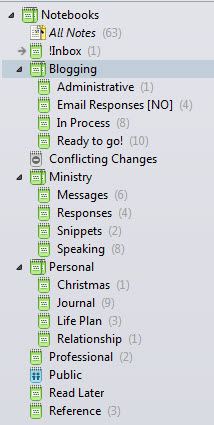
This list is a work in process and I am still fine tuning it. One thing I learned from others is creating “!Inbox” as my default notebook. This is where I put random content and clippings until I figure out where I should put them. (The exclamation point keep this notebook sorted at the top.)
I have been using Evernote for almost a year now and its become my virtual filing system. I uses it on my tablet, my smartphone and my laptop. My life would definitely be less organized without it.
Here are a couple of resources to get you started if you want more information:
- ‘7 Evernote Resources You May Not Know About’ by Michael Hyatt
- ‘What’s All the Fuss About Evernote? Should I Be Using It?’ by Melanie Pinola (Lifehacker)
How do you organize your busy life?
Do you use Evernote?